
 Join our Discord
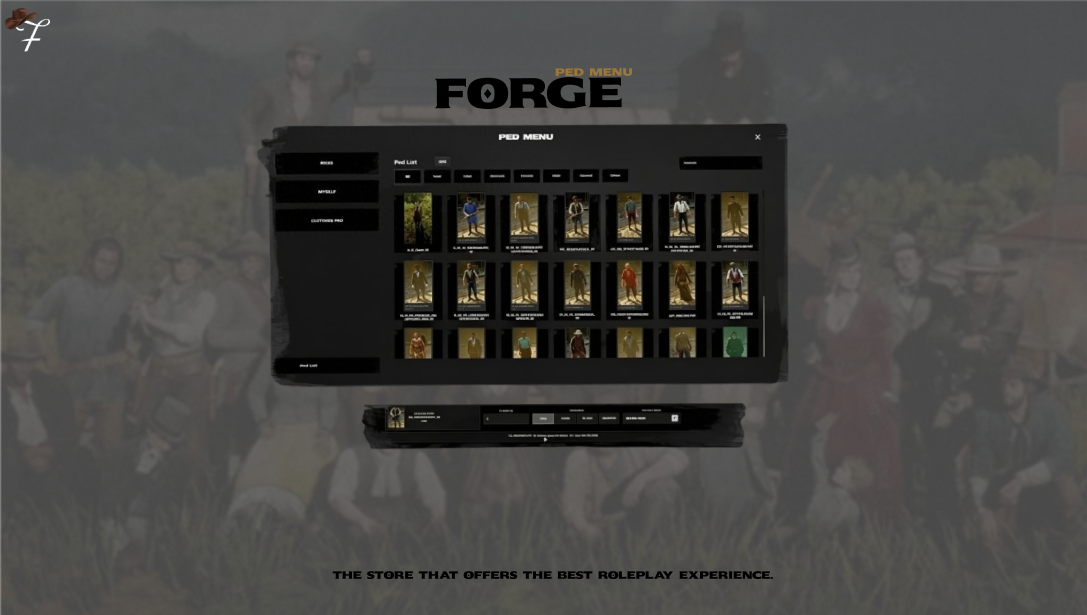
Forge Ped Menu
Advanced Ped Management System for RedM
Forge Ped Menu is a premium ped management solution developed for RedM roleplay servers. Built with a modern user experience in mind, it provides players and administrators with a fast, intuitive, and highly configurable way to manage character models.
Featuring a fully custom NUI, searchable ped previews, category filtering, ped ownership tracking, expiration management, and advanced administration tools, Forge Ped Menu simplifies every aspect of ped distribution and customization.
Features
Modern Interface
Fully custom NUI
Clean and responsive design
Fast navigation and search system
Optimized for large ped collections
Professional user experience
Ped Browser
Search peds by model name
Category-based filtering
Instant ped selection
Configurable category system
Custom ped organization support
Ped Preview Images
Visual ped previews directly inside the menu
Easy identification of ped models
Faster browsing experience
No need to memorize model names
My Peds System
Dedicated owned ped section
Quick access to available peds
Expiration date display
One-click ped activation
Ped Variation Preview
Integrated customization mode
Camera-focused preview environment
Transparent navigation controls
Outfit variation selector
Smooth character preview workflow
Administrative Tools
Built-in Give Ped panel
Direct player assignment
Visual assignment confirmation
Temporary and permanent access support
Complete expiration management
Expiration System
Available duration presets:
1 Day
7 Days
30 Days
Unlimited
Custom expiration dates can also be assigned manually.
Multi-Language Support
Included languages:
English
Turkish
German
Additional languages can be added through configuration files.
Framework Compatibility
Supported frameworks:
VORP
RSG-Core
RedEM-RP
Discord Logging
Webhook support
Assignment logs
Administrative action tracking
Administration Workflow
Administrators can quickly assign peds through a dedicated management panel.
The Give Ped interface includes:
Selected ped preview image
Ped model information
Category information
Target player ID field
Duration presets
Manual expiration date selector
Final confirmation summary
This workflow minimizes errors and provides a streamlined management experience.
Player Workflow
Players can access all available peds through the My Peds section.
Available functionality:
View owned peds
Activate peds instantly
Check expiration dates
Preview ped variations
Enter customization mode
When entering customization mode, the menu automatically closes and the camera focuses on the player character, creating a clean and immersive preview experience.
Configuration
The script is fully configurable through config.lua.
Core Settings
Language
Config.Language = "en"
Supported values:
en
tr
de
Framework
Config.Framework = "VORP"
Supported values:
VORP
RSG
REDEMRP
Menu Command
Config.OpenMenu
Defines the command used to open the menu.
Ped List
Config.Peds
Main list of available ped models.
Ped Categories
Config.PedCategories
Category buttons displayed in the interface.
Category Mapping
Config.PedCategoryMap
Optional manual category assignments.
Webhook Settings
Config.Webhook
Discord logging configuration.
Ped Categories
Default categories:
All
Law
Jobs
Animals
Female
Male
Special
Other
Categories can be customized directly from the configuration.
Database
CREATE TABLE IF NOT EXISTS `forge_pedmenu` (
  `charid` varchar(50) DEFAULT NULL,
  `identifier` varchar(50) DEFAULT NULL,
  `data` longtext NOT NULL DEFAULT '[]'
) ENGINE=InnoDB DEFAULT CHARSET=utf8 COLLATE=utf8_general_ci;
Installation
Place the resource folder inside your resources directory.
Import the included SQL file.
Configure your framework in
config.lua.Add the resource to your server configuration:
ensure forge-pedmenu
Restart the server or ensure the resource manually.
Dependencies
Required:
RedM Server
oxmysql
Supported Frameworks:
VORP
RSG-Core
RedEM-RP
Technical Notes
Ped expiration dates are stored as Unix timestamps.
Unlimited access uses a far-future expiration value internally.
Ped preview images are loaded from
ui/assets/img/peds.Additional translations can be added through
Config.Locale.
Suitable For
Character Management Systems
Server Staff Characters
Event Characters
Custom Roleplay Characters
Temporary Character Access
Exclusive Character Collections
Community Roleplay Projects
Forge Ped Menu
Forge Ped Menu delivers a professional, streamlined, and efficient ped management experience for RedM servers. Whether managing a small private community or a large public roleplay server, it provides all the tools necessary to organize, assign, preview, and manage character models through a clean and user-friendly interface.